
Original sound
Keep It Gangsta
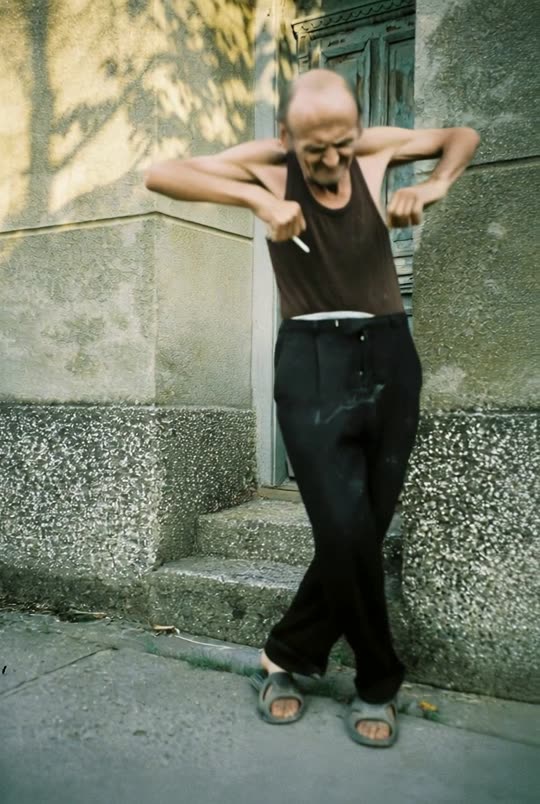
The laid-back moves from the Keep It Gangsta trend.
5 s preview · 15 credits
Full 20.5 s · 62 credits
Pick a trending dance or upload the one you saw on TikTok. Add a photo of one person, and they do the same moves, with the original sound. Try 5 seconds first, then make the full video.
JPG or PNG, up to 10 MB. One person, both hands in view, full body or waist-up.
The preview is the best 5 seconds of the dance, with sound. You see the price before you start. If a video fails, your credits come back automatically.
Made from 1 photo
Example
Each card plays the original dance with its sound. Pick one, add your photo, and the person in it does the same moves.
The laid-back moves from the Keep It Gangsta trend.
5 s preview · 15 credits
Full 20.5 s · 62 credits
The hand-gesture routine from the Pardon trend.
5 s preview · 15 credits
Full 13.3 s · 40 credits
Kicks, spins and poses to Soda Pop.
5 s preview · 15 credits
Full 9.8 s · 30 credits
The Smooth Criminal remix dance from TikTok.
5 s preview · 15 credits
Full 11 s · 33 credits
Big arm swings and steps from the Rasputin trend.
5 s preview · 15 credits
Full 11 s · 33 credits
The hands-out moves from the Bad Times trend.
5 s preview · 15 credits
Full 11 s · 33 credits
The 6-7 hand bounce from the viral trend.
5 s preview · 15 credits
Full 14.1 s · 43 credits
We add new dances as trends take off. Don't see yours? Upload the video above.
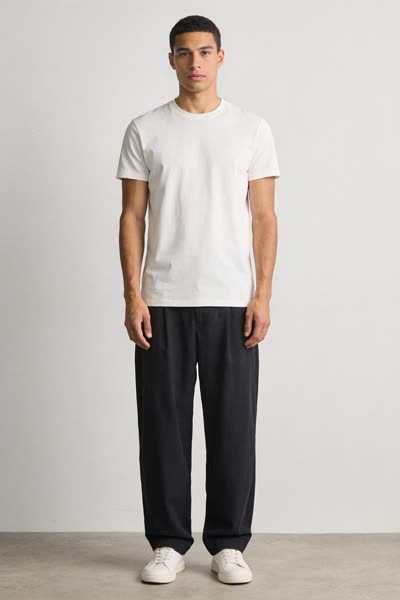
The first card is a 5-second preview made from one photo; the small picture is the photo we used. The other cards play the original dances.
The person in our example is AI-generated.
Choose a trending dance, or upload the dance video you saved.
A clear photo of one person, both hands in view.
Try 5 seconds first. Like it? Make the full video, then download and post it.
Want a photo to move without a dance? Try photo to video.
Saw a dance that isn't on our list? Upload the video file, and the person in your photo copies the moves. The full video runs as long as yours and keeps its sound unless you turn it off.
| Trending dance | Your own video | |
|---|---|---|
| Preview | Best 5 s, 15 credits | First 5 s or the 5 s you pick, 15 credits |
| Full length | Set by the dance, up to 30 s | Same as your video, 3–30 s |
| Video shape | Same as your photo | Same as your photo |
| Full video, 720p | 3 credits per second | 3 credits per second |
| Full video, 1080p | 5 credits per second | 5 credits per second |
| Sound | Original sound | Keep or remove |
If there's more than one person, only one of them dances and the others may vanish from the video.
Arms down or relaxed works best. Skip arm's-length selfies where one hand holds the phone.
The video takes the shape of your photo. For TikTok, Reels or Shorts, use a tall photo.
A full-body photo for a full-body dance, waist-up for waist-up.
No hands over the face, no cropped head or feet.
Use your own photo or one you have permission to use. Photos of public figures are often rejected.
Try a sharper, front-facing photo, or switch to Pro 1080p.
The AI dance effect is a short video where the person in a still photo does a trending dance. It spread on TikTok through effects like the AI sway dance, where a selfie turns into a swaying clip.
On TikTok, the effect lives inside the app and may not show up in your region. A CapCut template is a fixed edit you fill with photos. Here, a real dance video drives the moves, so you can pick a trending dance or bring the one you saw.
For another trend, see the Tiny Desk AI video.
Post your take on this week's dance without learning the steps.
Make the birthday person dance, with their OK.
One clip per person, posted as a set.
Send a dancing version of your own photo and see who replies first.
Try a drawn or 3D character with a human-like body.
When words can't say it, a dance can.
Want sound made from scratch? See the AI video generator with audio.
One-time payment, no auto-renewal. Credits last 365 days and work on every model here.
| Pack | Price | Credits | 5-second previews | Full 15-second videos at 720p |
|---|---|---|---|---|
| Starter | $9.99 | 130 | 8 | 2 |
| Standard | $19.99 | 266 | 17 | 5 |
| Advanced | $39.99 | 538 | 35 | 11 |
A 5-second preview is 15 credits. A full video is 3 credits per second at 720p and 5 at 1080p. Each dance card shows both prices.
New accounts may get enough free credits for one 5-second preview.
New accounts may get enough free credits for one 5-second preview of any dance, with sound. If you like it, the full video is 3 credits per second at 720p. No subscription.
The preview is the best 5 seconds of the dance at 720p, with sound, for 15 credits. The full video is the whole dance, up to 30 seconds, made as a new render at 720p or 1080p. On your first full video, the 15 credits from its preview are taken off the price; after that, previews and full videos are priced separately.
It takes your photo and a dance video, then moves the person in your photo the way the dancer moves, for the same length. It runs on Kling 2.6 Motion Control.
Yes. Upload the Sway video you saved and add a photo. The video keeps the dance's original sound. It isn't the TikTok effect itself, but you can post it the same way.
Yes. Upload an MP4 or MOV file of 3 to 30 seconds, under 100 MB, with one dancer in one continuous shot. Links aren't supported. Preview 5 seconds for 15 credits, then make the full video at 3 credits per second at 720p.
Not in one video yet. The model moves one person. If your photo has several people, only one of them dances and the others may vanish from the video.
Yes. Trending dances keep their original sound. With your own video, you can keep the sound or remove it. Make sure you can use the music where you post.
Usually a few minutes, longer for long dances or when the queue is busy. You can leave the page and find the video later in your history.
No. It works in the browser on your phone or computer.
If it fails or is blocked, your credits come back automatically. If the moves are very fast, the video may end early and come back shorter; that still counts as a finished video. Videos have no watermark.
See current prices on the pricing page. Kling is a trademark of its owner. Dance names refer to public trends; this site is not affiliated with Kuaishou, TikTok or the artists. The person in our example is AI-generated. Label AI videos when you post them.